


Use your browser's back button to return to the page you were just on.
|
|
Use your browser's back button to return to the page you were just on. |
Gregath Publishing e-zine
Volume 7, Number 3
March, 2008
Helping writers, genealogists and computer users of all kinds
-*-*-*-*-*-*-*-*-*-*-*-
Please note that while an effort to generalize much of this text has been made, some references to "we, our, etc." still occur and much of the information provided applies to The Gregath Publishing Company and may not with other printer/publishers. ALWAYS double check with your printer/publisher on every detail.
-*-*-*-*-*-*-*-*-*-*-*-
Table of Contents
You may click on each department below to
go directly to that article. At the end of each article (if supported) is
a link back to this contents.
What's It
Mean?
Design Inspiration
Book Manufacturing Concepts
Marketing Advice
Genealogy Ideas
Computer Help
-*-*-*-*-*-*-*-*-*-*-*-
///////////////////////////////
What�s It Mean?
///////////////////////////////
Double Wire Binding: Soft type of binding where spine of book consists of double wire loops threaded through holes in book block. This method is more durable then spiral binding.
Front matter: All the pages in the front of the book, leading up to the text proper - title page/verso, dedication, table of contents, frontice piece, preface, etc.
-*-*-*-*-*-*-*-*-*-*-*-
For other printing, publishing, marketing lingo, check our glossary at http://www.gregathcompany.com/gloss.html
Run across a word that you don't understand?
Try us - e-mail
us your word, term or phrase and we will see if we can
shed some light on the matter!
-*-*-*-*-*-*-*-*-*-*-*-
///////////////////////////////
Design Inspiration
///////////////////////////////
What do I do now that I have all of my data for a manuscript - each piece in a different file?
Overlooked format items that can be altered or added to the text file at any time include headers, footers, and page numbers.
-*-*-*-*-*-*-*-*-*-*-*-
This section is drawn from
http://www.gregathcompany.com/FAQ\manuscript.html
-*-*-*-*-*-*-*-*-*-*-*-
///////////////////////////////
Book Manufacturing Concepts
///////////////////////////////
Why do I need my manuscript to be in a few (or single) data file?
Unless you have produced your entire manuscript from the same template, putting your data into a single file insures format, such as margins, header/footer, and page number remains the same throughout all the pages in that file/book. Additionally, if you are submitting for digital publication, this can save you in service fees. If you are preparing an e-book, your readers will thank you as well.
-*-*-*-*-*-*-*-*-*-*-*-
This section is drawn from
http://www.gregathcompany.com/FAQ\manuscript.html
-*-*-*-*-*-*-*-*-*-*-*-
///////////////////////////////
Marketing advice - NA
///////////////////////////////
///////////////////////////////
Genealogy ideas
///////////////////////////////
Stamping Your Books
By Cari Thomas
I found Gene Ewert's suggestions about things to do when taking a
genealogy trip of great value, and several "rookie mistakes" he
mentioned were ones I've encountered through my years. Thanks Gene.
Gene suggested that the greatest rookie mistake was to not write
identification and contact information in your notebooks so that they
could be returned if lost. I would like to pass along an additional
suggestion.
I say "pass along" because this tip comes compliments of my late
mother-in-law, Mary Lib Tipton Thomas, who was a junior high school
librarian in Ohio for many years.
Mary Lib's practice was not only to write identifying information on
the insides of the front and back covers as Gene Ewert suggested, but
to include it in the middle of the book as well. She always put the
school logo stamp on page fifty of each book in her library or in the
middle of the book if it had less than fifty pages.
A book would still be identifiable (and therefore returnable) because
of that interior stamp, even if it had lost its cover or end pages.
This tip is especially valuable for irreplaceable genealogical
notebooks and records.
To read Gene Ewert's article, "What I Learned from my Genealogy Trip,"
visit:
http://ftp.rootsweb.com/pub/review/2007/1031.txt
Previously published in RootsWeb Review: 7 November 2007, Vol. 10, No. 45
-*-*-*-*-*-*-*-*-*-*-*-
Have a tip? e-mail
us
-*-*-*-*-*-*-*-*-*-*-*-
///////////////////////////////
Computer aid!?!
///////////////////////////////
In MS Word, some files look different "on the page" in the computer. What causes this?
It's called page view. Yes, you can set your program to
show you the pages in different ways. It's easy once you know how. Look down the
screen to near
the start button - where there are several "lines" of gray "stuff" before you
see the bottom edge of the document. At the top left of all of this gray are
4 buttons before the side-to-side scroll bar starts. The page view with the
dotted line to show page break is called "normal" and it is that far left
button (depressed) - the arrow below is pointing to these buttons:
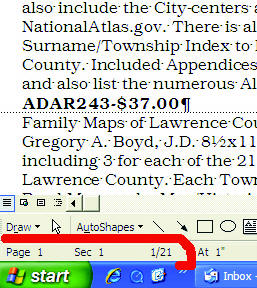
To see how the other 3 views work,
position a file where you can see the page break and just left click each
button in turn. Besides normal view, I sometimes like print view which is
the third button from the left, as it shows me virtual sheets of paper with
the correct margins and page number too. - CAC
-*-*-*-*-*-*-*-*-*-*-*-
Note: All references to
"click" are using the left mouse button unless otherwise noted.
Have a question or tip?
e-mail
us We may be stumped, but either way you'll get a personal reply.
-*-*-*-*-*-*-*-*-*-*-*-
///////////////////////////////
About this e-zine
///////////////////////////////
Gregath Co. is pleased to present information that may be of help to authors and genealogists on a monthly basis in this format.
If you have decided since you
requested this newsletter that you prefer not to receive mailings, please go to
the following page and fill out the subscribe/unsubscribe form to be
automatically dropped from the mailing list:
http://www.gregathcompany.com/zine
This set of directions is also the way to subscribe to this e-zine to get
your own copy in your box monthly (if not already a subscriber).
NOTE: If trying to unsubscribe, supplying a different email address then the one
you signed up with will result in multiple copies rather then being
unsubscribed.
Back Issues available through http://www.gregathcompany.com/zine
-*-*-*-*-*-*-*-*-*-*-*-
Copyright and reprint information
Gregath Co. is happy to give permission to forward this e-zine in its entirety, INCLUDING all contact information, to any person or group. To excerpt this e-zine for any form of reproduction, you must contact us to request permission. All material is copyright by The Gregath Publishing Company, as staff members are responsible for the content.